

Gaming
Penalty Shooters 2 – Penalty Shooters 2 Unblocked 76
Penalty Shooters 2 is an engaging online game that brilliantly captures the nail-biting tension and exhilaration of real-life penalty shootouts.


Imagine the electrifying atmosphere of a crowded stadium, the tension of a drawn match, and it all comes down to one decisive penalty kick. Penalty Shooters 2 takes you right to that nail-biting moment, making you the star of the show. Your decisions, your tactics, and your skills are what stand between victory and defeat. This isn’t just a game – it’s a thrilling test of your football prowess and your under-pressure decision-making.
Every element of Penalty Shooters 2 has been crafted with a clear emphasis on realism and player engagement. The controls are smooth and intuitive, the graphics are crisp, and the gameplay is utterly addictive. It’s like having a football pitch right in your browser, ready and waiting for your winning kick!
The game’s range of international teams lets you wear the colors of your country proudly, while its challenging AI opponents ensure you’re always on your toes. From deciding which corner of the goal to aim for, to guessing the direction of your opponent’s shot as a goalie, Penalty Shooters is all about mastering the art of the penalty shootout.
Master Your Penalties with Penalty Shooters 2
Have you ever experienced the thrilling pressure of a football match’s deciding moments, right on your computer screen? That’s the excitement this game delivers! This riveting unblocked game is transforming armchair enthusiasts into skilled penalty takers and fearless goalkeepers. Let’s delve into the mesmerizing gameplay and intuitive controls that make Penalty Shooters 2 such an irresistible choice for online gamers worldwide.

Engaging Gameplay
Penalty Shooters 2 makes every player feel like a football star. It serves up a menu of national teams, allowing you to represent your country in a pulsating series of penalty shootouts. What makes the game stand out is its perfect blend of simplicity and depth. You’re not just aimlessly kicking a ball; you’re studying your opponent, making strategic decisions, and sharpening your reflexes.
Every match in Penalty Shooters consists of five penalty shots per team. It’s a high-stakes battle against the game’s impressive AI. The game pushes your skills to the limit, from the very first whistle to the final decisive penalty.
And for those hungering for glory, Penalty Shooters also features a compelling tournament mode. Rise through the ranks, outplay your opponents, and bring home the coveted trophy!
Intuitive Controls
The controls in Penalty Shooters 2 are wonderfully straightforward, making it accessible for beginners yet challenging enough for the seasoned gamers.
When it’s your turn to strike, a moving arrow appears above the ball. Your task? Click your mouse or tap your screen at the right moment to stop the arrow, aiming your shot in the desired direction. The goal is to outsmart the AI-controlled goalkeeper and send the ball rippling into the net!
However, the challenge doesn’t end there. When playing as a goalkeeper, you need to guess where the shot is headed. A single click or tap decides your dive direction. It’s a game of nerves, intuition, and timing. Will you manage to keep your cool and make the match-winning save?
Various Levels in Penalty Shooters 2
Penalty Shooters 2 is an engaging online game that offers a multitude of levels, each increasing in intensity and competition as you progress. The game is structured into a series of tournaments that you must conquer, and each tournament is considered a level.
At the beginning of the game, you’re required to select your team from a wide range of international options. Once you’ve chosen your team, you enter the first level or tournament. This initial stage typically features less challenging AI-controlled teams, making it the perfect platform for beginners to get a grip on the controls and mechanics of the game.
As you win matches and advance through the tournament, you move on to the next level. Each new level or tournament brings tougher, more competitive AI teams to the field. These AI opponents are excellent at guessing your shooting or saving tactics, demanding that you continuously adapt and evolve your strategy to progress further.
Winning each level requires you to outscore your opponents in a series of five penalty kicks. If the scores are level after these initial kicks, the match goes into a sudden death scenario where every kick can decide the outcome.
Tips and Tricks To Play Penalty Shooters 2
- Study the Goalkeeper’s Movements: Pay close attention to the goalkeeper’s movements before you take your shot. This can provide clues about which way they might dive.
- Change Your Shooting Direction: Don’t repeatedly shoot in the same direction. Mixing it up makes it harder for the AI goalkeeper to predict your next move.
- Delayed Clicking: When you’re the goalkeeper, consider delaying your click or tap. Waiting until the last moment can improve your chances of guessing the right direction.
- Practice Patience: Mastering Penalty Shooters 2 takes time. Don’t rush – take your time to understand the AI’s pattern.
- Try Different Teams: Each team in Penalty Shooters has different characteristics. Experiment with different teams to find the one that suits your playing style best.
- Play The Tournament Mode: Tournament mode is a great way to hone your skills. The increasing difficulty of the matches will challenge and improve your game.
- Remember, Practice Makes Perfect: The key to becoming a pro at Penalty Shooters 2 is practice. The more you play, the better you’ll become at predicting your opponent’s moves and perfecting your shots.
Game Features
- International Teams: With a broad range of international teams to choose from, Penalty Shooters 2 lets you represent your favorite country on the football field, adding an extra layer of personal investment and fun.
- Realistic AI: The artificial intelligence of the game is highly advanced. As you progress through the levels, your AI opponents become increasingly skilled, mimicking the unpredictability and challenges of real-life penalty shootouts.
- User-Friendly Controls: The controls of Penalty Shooters 2 are intuitive and easy to grasp, making it accessible for players of all ages and skill levels. Despite this simplicity, the game maintains a high level of challenge and excitement.
- Tournament Mode: The game features a thrilling tournament mode where you can lead your chosen team to glory. Progress through each stage of the tournament and experience the growing intensity of each match.
- High-Stakes Gameplay: In Penalty Shooters 2, every penalty kick can make or break the match. This high-pressure scenario creates an electrifying atmosphere and tests your decision-making skills under stress.
- Accessible Anywhere: As an unblocked game, Penalty Shooters is accessible from any device with internet access. Whether you’re on a break or just relaxing at home, you can jump into the excitement of a penalty shootout.
Ending Words
Penalty Shooters 2 stands out as an engaging online game that brilliantly captures the nail-biting tension and exhilaration of real-life penalty shootouts. From its user-friendly controls to its progressive levels, realistic AI, and the liberty to choose from a variety of international teams, the game offers a unique and immersive football experience to players of all skill levels.
Moreover, its status as an unblocked game makes it easily accessible, allowing you to enjoy a riveting football match irrespective of your location. Whether you’re a novice or a seasoned gamer, Penalty Shooters promises a fun-filled, challenging journey towards becoming a penalty kick legend. So, why wait? Lace up your virtual boots, step onto the pitch, and let the thrilling journey begin with Penalty Shooters 2!
Frequently Asked Questions
How do I control the direction of my shot in Penalty Shooters 2?
The shot direction is controlled by a moving arrow above the ball. Click or tap at the right moment to stop the arrow and aim your shot.
How do I save shots as the goalkeeper in Penalty Shooters?
As a goalkeeper, you need to click or tap to decide your dive direction. The timing of your click or tap can be crucial to making a successful save.
Can I choose my own team in Penalty Shooters?
Yes, Penalty Shooters lets you select from a variety of international teams at the start of the game.
How does the tournament mode in Penalty Shooters 2 work?
In tournament mode, you guide your chosen team through a series of matches. Each match you win moves you closer to the tournament championship.
People Also Searched For
- Slope Unblocked Games
- Moto X3m
- 1v1.lol Unblocked 66
- Fireboy And Watergirl Unblocked
- Happy Wheels Unblocked Games
- Minecraft Unblocked Games 66
- Drift Hunters Unblocked
- Tunnel Rush Unblocked
- Eggy Car Unblocked 66
- Google Baseball Unblocked
- Fall Boys Unblocked
- Bouncy Rush
- Cookie Clicker Unblocked Games
- Pixel Combat 2
- Little Alchemy 2
- Subway Surfers Unblocked
- Planet Clicker 2
- Retro Bowl Unblocked
- Big Tower Tiny Square Unblocked
- Rooftop Snipers Unblocked
- Getaway Shootout Unblocked
- Papa’s Cheeseria
- Heardle Game
- Iron Snout Unblocked
- Basketball Legends
- Flappy Bird Unblocked
- Highway Racer
- Geometry Dash Unblocked
- Crazy Shooters
- Basketball Stars Unblocked
- Rummy Wealth
- Among Us Unblocked
- 8 Ball Pool Unblocked
- Garden Tales
- Mahjong Connect
- Coin Clicker
- Tetris Unblocked
- Chess Unblocked
- Stickman Hook Unblocked
- Mario Unblocked
- Tiny Fishing Unblocked
- Bob The Robber Unblocked
- Fortnite
- io Unblocked Games
- 2048 Unblocked
- Cricmania
- Smash Karts Unblocked
- Drive Mad Unblocked
- Tallman Run
- Monkey Mart
- Snow Rider 3D Unblocked
- Unblocked Games WTF
- Unblocked Games
- Crossy Road Unblocked
- Cat Ninja Unblocked
- Slither.io Unblocked

A quick browser game usually gives you a clear objective within seconds. A large open-world adventure asks you to make more decisions: where to go, what to practise and how much time to spend exploring.
As players prepare for Vice City, searches for editions, platform information and GTA 6 accounts address the question of access. Once you start playing, your everyday habits shape the experience.
These six approaches can help you settle into GTA 6 without turning your first sessions into a race through someone else’s checklist.
1. Learn the controls before chasing efficiency
Give yourself time to become comfortable with movement, camera control and the actions introduced during the opening.
Read prompts instead of dismissing them automatically. If a camera setting or control option feels uncomfortable, explore the available settings before frustration becomes part of every encounter.
Practise one unfamiliar action at a time. Trying to memorise everything immediately can make a straightforward introduction feel more complicated than it needs to be.
The goal is to reach a point where you can pay attention to the world instead of constantly looking down at the controller.
2. Build map awareness gradually
A large map becomes easier to understand when locations connect to something you remember.
Notice distinctive buildings, major roads and changes in the landscape. After a journey, try recalling how the destination relates to the area where you started.
Use navigation tools to support that understanding, rather than following directions without observing your surroundings.
This habit transfers across open-world games. Recognising a route or neighbourhood makes later journeys feel more familiar and gives exploration a stronger sense of place.
3. Give each session one main goal
Choose a manageable purpose before you begin: continue the story, practise a mechanic or explore an area that caught your attention.
You can change your mind during play. The goal simply provides direction when several possibilities compete for your time.
For a short session, avoid setting an objective that depends on completing a long chain of activities. Leave room to stop at a sensible point.
A small achievement can make half an hour satisfying without requiring major progress through the game.
4. Balance objectives with curiosity
Following the story provides structure, while exploring gives you opportunities to notice details you might otherwise miss.
Try alternating between the two. After a focused stretch of objectives, allow yourself time to look around. If wandering starts to feel aimless, return to a clearer task.
Resist treating every distraction as something that must be completed immediately.
You do not need to exhaust an area on your first visit. Leaving something unexplored gives you a reason to return and helps preserve the pleasure of discovery.
5. Treat mistakes as useful information
An unsuccessful attempt can reveal something specific: an unfamiliar control, a poorly chosen route or a moment when you acted too quickly.
Identify one thing to change before trying again. Repeating the same approach while becoming increasingly frustrated rarely makes the problem clearer.
A brief pause can help you recognise what happened.
Gaming marketplaces such as GameBoost help gamers find accounts, items and services across different titles. Learning controls and developing judgement still come from spending time with the game.
6. Use guides when they solve a real problem
A guide is most useful when you know what you need from it.
Search for a particular control or objective instead of opening a complete walkthrough by default. Check headings and thumbnails for spoilers before reading further.
Give yourself a chance to experiment first, then seek help if the obstacle stops being enjoyable.
You can borrow advice without copying an entire playthrough. Your pace, interests and discoveries are what make an open-world adventure feel like your own.
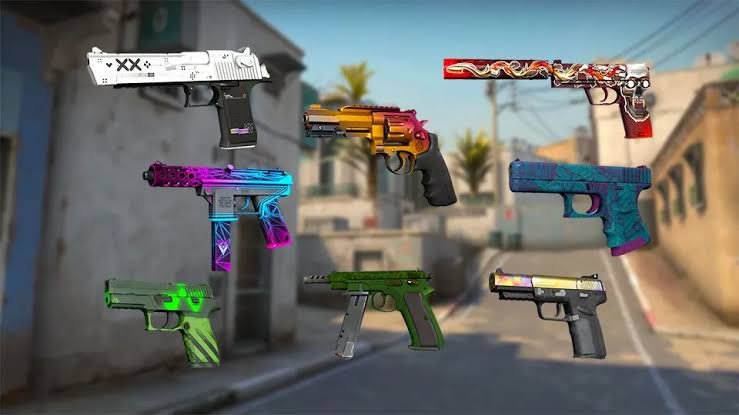
Walking into the buy menu for the first time can feel like opening a weapons catalog with no instructions. The full list of CS2 guns includes pistols, submachine guns, rifles, sniper rifles and heavy weapons, and some of them are available only to one side. Knowing what each category is good at helps you spend money wisely and win more rounds. Here is a simple overview to get you started.
Pistols
Every player starts with a pistol: the Glock-18 for Terrorists and the USP-S or P2000 for Counter-Terrorists. Upgrades include the P250, Dual Berettas, CZ75-Auto, Tec-9, Five-SeveN, Desert Eagle and R8 Revolver. Pistols are vital in the first round of each half and in low-money rounds.
SMGs
Submachine guns such as the MAC-10, MP9, MP7, MP5-SD, UMP-45, P90 and PP-Bizon are cheaper than rifles and great at close range. They also give a larger money reward per kill, which makes them useful when your team needs to rebuild its economy.
Rifles
Rifles are the backbone of full-buy rounds. Terrorists rely on the AK-47 and Galil AR, while Counter-Terrorists use the M4A4 or M4A1-S and the FAMAS. Scoped rifles, the SG 553 for Terrorists and the AUG for Counter-Terrorists, offer extra precision at long range.
Sniper Rifles
The AWP is the most powerful sniper and can take down an enemy with one shot to the body. The SSG 08 is a light, affordable alternative, and the semi-automatic G3SG1 and SCAR-20 are expensive options used mostly in specific situations.
Heavy Weapons
Shotguns such as the Nova, XM1014, MAG-7 and Sawed-Off are deadly in tight corners, while the M249 and Negev machine guns can spray down whole areas. They are situational, but in the right spot they can surprise any opponent.
Economy Basics: When to Buy What
In Counter-Strike 2, money is shared across rounds, so what you buy now affects what your team can afford later. A common rhythm is to buy rifles and armor when the whole team can afford them, save together after a lost round, and use cheaper SMGs or upgraded pistols when money is tight. Coordinating buys with teammates is just as important as choosing the right gun among all CS2 weapons.
Do not forget utility. Smokes, flashbangs, Molotovs and HE grenades often win more rounds than an expensive gun, and they are cheap compared with rifles. A balanced buy with armor, a rifle and a couple of grenades is usually better than the most expensive weapon with nothing else.
Side-Specific Weapons at a Glance
Terrorists: Glock-18, Tec-9, MAC-10, Galil AR, AK-47, SG 553, G3SG1, Sawed-Off.
Counter-Terrorists: USP-S or P2000, Five-SeveN, MP9, FAMAS, M4A4 or M4A1-S, AUG, SCAR-20, MAG-7.
Both sides: P250, Dual Berettas, Desert Eagle, most SMGs, the AWP, SSG 08 and most heavy weapons.
FAQ
Why can I not buy every gun?
Some weapons are side-specific, and Counter-Strike 2 also uses a loadout system where you choose which guns appear in your buy menu.
Which gun should a beginner learn first?
Start with the main rifle of each side, the AK-47 and an M4, because they are used in most rounds.
Do skins change how guns perform?
No. Finishes are cosmetic only; damage and recoil never change.

For a short break, start with Tic-Tac-Toe or Reaction Duel if you want a simple challenge, Hangman or Word Duel if you prefer words, and Connect 4 if you have time for a few strategic moves. Each has a familiar goal, so you can get into a round without learning a complicated game. Browser play also saves you an installation, whether you are playing alone or challenging a friend. If you are searching for unblocked games, though, remember that playing in a browser does not mean a site is available on every school or workplace network.
What Makes a Browser Game Work for a Short Break?
Start with the clock. A game that takes one quick round is easier to fit between classes or during a scheduled work break than one that needs a long match. Simple controls matter just as much. If you can understand what to do from the first screen, you spend your break playing rather than figuring out how to navigate a menu. Games that can be paused between turns are useful when you cannot promise another player your full attention.
Think about where you will play, too. A quiet word puzzle may suit a shared room better than a game that relies on sound. On a phone, large buttons and a clear screen can make a quick round more comfortable; at a desk, a mouse may make a familiar board game feel natural. A page that requires no app-store download or account creation also avoids two steps that can take longer than the game itself. It still needs a working connection, and the game must be allowed on the network you are using.
Finally, notice what surrounds the game. A short session feels less inviting if you must close several interruptions before making a move. A lean browser experience with few ad interruptions often suits a short casual session better than a heavy app with a lengthy setup. For a casual break, a clear route from opening the page to starting a round is often more useful than a large collection of features you will never use.
Quick Games for Short Sessions
When you have only a moment, pick a game with a familiar goal. Tic-Tac-Toe needs little explanation: take turns placing marks and try to complete a line. A reaction challenge offers a different kind of break. Rather than planning several moves ahead, you focus on one prompt and try to respond quickly. BeatMe Games lists Tic-Tac-Toe and Reaction Duel among its quick games. Either can be a useful starting point when you want a straightforward challenge, though the time a round takes can vary.
If you have a little more time, consider a word game. Hangman gives you a familiar guessing task, while Word Duel adds a competitive angle for someone who wants to play against a friend. If you would rather think through a small board, try Connect 4. It is easy to understand, but each move gives the other player something to answer. That balance makes it a good fit when you want more than a reflex test without starting a lengthy match.
For a solo break, the same time-first approach works with short word or puzzle games. Look for a round you can finish before you have to put your device away. If you are likely to be interrupted, choose a game that lets you stop comfortably rather than one that asks you to commit to a long attempt. A quick game is only a good break game if its pace fits the break you actually have.
Why Link-Based Multiplayer Fits Group Chats
Multiplayer does not have to begin with everyone downloading the same app. A shared game link can turn an ordinary group chat into a place to issue a quick challenge. One person starts a game, sends the URL, and the other person opens it in a browser. That removes the usual round of questions about which app to install and whether everyone has an account. It also makes a small game easier to suggest casually: a friend can see the challenge in the conversation where you already talk.
BeatMe Games uses that approach for free browser-based challenges. Its catalog offers over 40 games, including quick duels, score challenges and longer board games, that can be started through a shared URL. No app or sign-up is required to begin. You make a move and share a short challenge URL to play anyone with a link. That is a practical option when you want to invite one friend without organizing a formal gaming session. The site lists games for phones, tablets and computers, so the invitation need not assume that both people are sitting at desks.
The type of challenge matters more than the size of the chat. A reaction duel suits two people who are ready to play now. A turn-based board game works better when replies come at different times. In a busy conversation, a short score challenge gives friends a result to respond to without asking everyone to join the same live match. Pick the format that matches how quickly your friends are likely to answer, and a shared URL becomes an invitation rather than another task.
Modern browsers in 2026 can support responsive short multiplayer rounds, though actual play still depends on the game, device and connection. Keep expectations modest if someone is on a slow network or switching between devices. The appeal is not that every match will be flawless. It is that a small challenge can start with fewer steps, then end when the break does.

Playing at School or Work: Check the Context
“Unblocked games” is a common search phrase, but it is not a guarantee. A game may run in a browser and still be unavailable on a particular school or workplace network. Filters and local rules vary. If a page does not open, choose something permitted for that setting instead of treating a blocked page as a problem to get around. The same principle applies to the time you spend playing: a game that fits a scheduled break may not fit a lesson, meeting or task that needs your attention.
Consider the people nearby as well. Mute sound before opening a game in a quiet space, and avoid a multiplayer round if you may need to leave the other player waiting. A short puzzle or a single turn can be less disruptive than a match that asks for constant responses. On a shared computer, it is sensible to leave the browser as you found it and avoid entering personal details just to fill a few minutes.
This is where games without downloads or registration are useful, but their convenience is only one part of the decision. A suitable break game should also be easy to close, comfortable on the device you have and appropriate for the place you are in.
Choose by Time, Company and Mood
If you have very little time, try a familiar round of Tic-Tac-Toe or a reaction challenge. With a few minutes more, a word game gives you something to think about without demanding a long session. If a friend is available and you both want a little strategy, Connect 4 offers a more deliberate exchange. These are ways to match a game to your break, not fixed limits: a pause between turns or an unexpected interruption can change how long any match takes.
Then decide whether you want company. Solo games let you start and stop on your own terms. Link-based challenges make more sense when the fun is in comparing a move or result with someone else. If you share a game in a chat, tell your friend whether you are ready to play immediately or happy to wait for a reply. That small bit of context makes a spontaneous invitation easier to accept.
Before opening anything, check that the site is permitted on your network and that you have enough time to finish or step away. Choose a quiet format for a shared space and a simple one for a short pause. The best browser game for school or work is the one that gives you a worthwhile break without making the next part of your day harder.
-

 Finance4 years ago
Profitable Intraday Trading Advice For Novices
-

 Gaming3 years ago
Pixel Speedrun Unblocked Games 66
-

 Gaming4 years ago
Subway Surfers Unblocked | Subway Surfers Unblocked 66
-

 Internet4 years ago
Welcome to banghechoigame.vn – Your One-Stop Destination for Online Gaming Fun!
-
 Gaming4 years ago
Minecraft Unblocked Games 66 | Unblocked Games Minecraft
-

 Gaming4 years ago
Google Baseball Unblocked | Google Doodle Baseball Unblocked 66
-

 Gaming4 years ago
Tunnel Rush Unblocked | Tunnel Rush Unblocked 66
-

 Internet3 years ago
Premium Games Unblocked: Unleash Your Gaming Potential