

Gaming
Beyond the Console: Exploring the Impact of Gaming on Social Interaction in NZ Casinos
Several variables will influence future gaming in NZ casinos, including the further advancement of virtual reality technology.


Few forms of entertainment can compare to the immersive and compelling experience that gaming provides. People of all ages, from children to retirees have been captivated by video games for decades. But what if someone told you that playing video games doesn’t have to be done alone, in front of a TV or computer screen?
New Zealand’s thriving casino industry is a prime example of how video games can bridge the physical and virtual worlds to create the social dynamics in which players forge new friendships all around the world. This article looks at the intricate web of interactions between gambling and socializing in New Zealand’s casinos, shedding light on how these two phenomena have fused to create a dynamic new social setting for Kiwis and people globally.
The Evolution of Gaming Culture in New Zealand
New Zealanders have a long-standing affinity for gaming, with a rich history of traditional Maori games and imported Western pastimes. This interest has developed, expanding to include various pursuits, from classic card games and pokies (slot machines) to cutting-edge computer gaming devices.
With the advent of online gaming platforms and the rise of eSports, the gaming landscape in New Zealand has experienced a seismic shift. The boundaries between online and offline socializing are becoming more porous as playing games evolves from a lonely activity to a shared pastime.
The Fusion of Gaming and Casino Culture
Casinos in New Zealand have stimulated increased socialization since the gambling culture was introduced there. Games like poker and blackjack which have long been staples of casinos and require players to use a combination of strategy and social skills, have evolved into opportunities for socialization.
In addition, the advent of electronic gaming devices in social settings has added a new dimension to the entertainment industry. These machines provide a new spin on the classic card and table games. They are simplified versions of traditional card games like poker and blackjack, not limited to pro gamers, but aimed at a larger audience that may be unfamiliar with their nuances.
Competitive Gaming and Tournaments
The popularity of tournaments and other forms of competitive games is a notable effect of gaming on New Zealand’s casinos. These days, players from all walks of life may find an event or competition of their liking at any number of online and off casinos. Gatherings like this allow gamers to show off their abilities, make new friends, and generally have a good time.
These competitions foster a feeling of community and social engagement among gamers and extends beyond the confines of the console via activities such as sharing of strategies, discussion of current trends, and rooting for one’s favorite players.
Gaming-themed Bars and Lounges
Some New Zealand casinos have incorporated gaming-themed pubs and lounges to help bridge the gap between gaming and social engagement. In these establishments, gamers and non-gamers alike will find a friendly atmosphere ideal for socializing over drinks and conversation and playing video games together.
Playing arcades and modern consoles like the PlayStation and Xbox can be found at pubs with a gaming theme. Customers may play against one another, reminisce about their favorite games, and meet new people in these settings.
The Social Benefits of Gaming in New Zealand Casinos
There have been positive societal effects from the recent convergence of gaming and casinos in New Zealand. To begin, many people gather for casino nights because of how welcoming the environment is. There’s a spot for everyone, from seasoned gamblers to new gamers. Because of this variety, people from all walks of life may find common ground in their love of video games and form lasting friendships with one another.
Gaming promotes sociability and teamwork. Sharing everyday experiences, such as playing a multiplayer video game or sitting down for a game of poker, strengthens relationships between players. Friendships are made, bonds are strengthened, and these interactions typically continue after people leave the casino.
The Role of Technology and Virtual Reality
Casinos are always seeking innovative ways to combine socializing with gaming, as technology develops. In particular, virtual reality (VR) gambling has begun gaining popularity in several New Zealand casinos. Virtual reality gaming enables users to enter interactive digital environments and communicate with one another in real time, all without leaving their homes.
Envision yourself at a poker table with people from around the globe, right in the comfort of a plush lounge area of a casino. Now that’s the power of VR tech. Virtual reality has the potential to transform the way people mingle and engage inside casinos, making it an intriguing environment to explore further.
The Future of Gaming in NZ Casinos
People should anticipate even more novel technologies at play for social interaction inside casinos as the gaming and gambling industries merge. Several variables will influence future gaming in New Zealand casinos, including the further advancement of virtual reality technology, the creation of new gaming trends, and the expanding popularity of e-Sports.
In conclusion, the casino culture in New Zealand has been revitalized as a result of incorporating gaming activities into conventional casino offerings. As a result, gaming parlors have evolved into vibrant communities in their own right, serving as meeting places for locals of all backgrounds. We can only expect the connection between gaming and casinos in New Zealand to strengthen as technology continues to develop and expand.

A quick browser game usually gives you a clear objective within seconds. A large open-world adventure asks you to make more decisions: where to go, what to practise and how much time to spend exploring.
As players prepare for Vice City, searches for editions, platform information and GTA 6 accounts address the question of access. Once you start playing, your everyday habits shape the experience.
These six approaches can help you settle into GTA 6 without turning your first sessions into a race through someone else’s checklist.
1. Learn the controls before chasing efficiency
Give yourself time to become comfortable with movement, camera control and the actions introduced during the opening.
Read prompts instead of dismissing them automatically. If a camera setting or control option feels uncomfortable, explore the available settings before frustration becomes part of every encounter.
Practise one unfamiliar action at a time. Trying to memorise everything immediately can make a straightforward introduction feel more complicated than it needs to be.
The goal is to reach a point where you can pay attention to the world instead of constantly looking down at the controller.
2. Build map awareness gradually
A large map becomes easier to understand when locations connect to something you remember.
Notice distinctive buildings, major roads and changes in the landscape. After a journey, try recalling how the destination relates to the area where you started.
Use navigation tools to support that understanding, rather than following directions without observing your surroundings.
This habit transfers across open-world games. Recognising a route or neighbourhood makes later journeys feel more familiar and gives exploration a stronger sense of place.
3. Give each session one main goal
Choose a manageable purpose before you begin: continue the story, practise a mechanic or explore an area that caught your attention.
You can change your mind during play. The goal simply provides direction when several possibilities compete for your time.
For a short session, avoid setting an objective that depends on completing a long chain of activities. Leave room to stop at a sensible point.
A small achievement can make half an hour satisfying without requiring major progress through the game.
4. Balance objectives with curiosity
Following the story provides structure, while exploring gives you opportunities to notice details you might otherwise miss.
Try alternating between the two. After a focused stretch of objectives, allow yourself time to look around. If wandering starts to feel aimless, return to a clearer task.
Resist treating every distraction as something that must be completed immediately.
You do not need to exhaust an area on your first visit. Leaving something unexplored gives you a reason to return and helps preserve the pleasure of discovery.
5. Treat mistakes as useful information
An unsuccessful attempt can reveal something specific: an unfamiliar control, a poorly chosen route or a moment when you acted too quickly.
Identify one thing to change before trying again. Repeating the same approach while becoming increasingly frustrated rarely makes the problem clearer.
A brief pause can help you recognise what happened.
Gaming marketplaces such as GameBoost help gamers find accounts, items and services across different titles. Learning controls and developing judgement still come from spending time with the game.
6. Use guides when they solve a real problem
A guide is most useful when you know what you need from it.
Search for a particular control or objective instead of opening a complete walkthrough by default. Check headings and thumbnails for spoilers before reading further.
Give yourself a chance to experiment first, then seek help if the obstacle stops being enjoyable.
You can borrow advice without copying an entire playthrough. Your pace, interests and discoveries are what make an open-world adventure feel like your own.
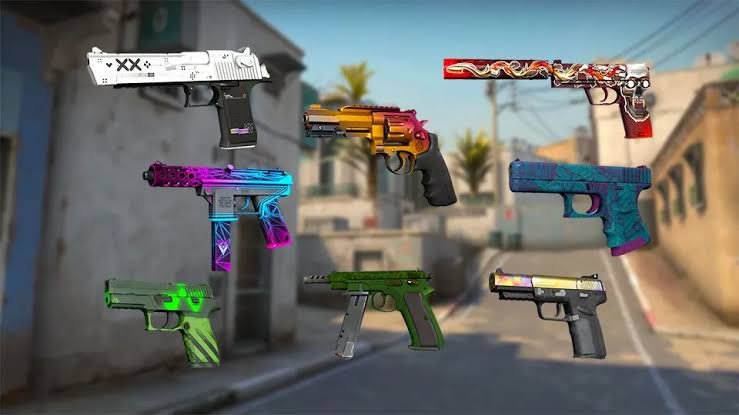
Walking into the buy menu for the first time can feel like opening a weapons catalog with no instructions. The full list of CS2 guns includes pistols, submachine guns, rifles, sniper rifles and heavy weapons, and some of them are available only to one side. Knowing what each category is good at helps you spend money wisely and win more rounds. Here is a simple overview to get you started.
Pistols
Every player starts with a pistol: the Glock-18 for Terrorists and the USP-S or P2000 for Counter-Terrorists. Upgrades include the P250, Dual Berettas, CZ75-Auto, Tec-9, Five-SeveN, Desert Eagle and R8 Revolver. Pistols are vital in the first round of each half and in low-money rounds.
SMGs
Submachine guns such as the MAC-10, MP9, MP7, MP5-SD, UMP-45, P90 and PP-Bizon are cheaper than rifles and great at close range. They also give a larger money reward per kill, which makes them useful when your team needs to rebuild its economy.
Rifles
Rifles are the backbone of full-buy rounds. Terrorists rely on the AK-47 and Galil AR, while Counter-Terrorists use the M4A4 or M4A1-S and the FAMAS. Scoped rifles, the SG 553 for Terrorists and the AUG for Counter-Terrorists, offer extra precision at long range.
Sniper Rifles
The AWP is the most powerful sniper and can take down an enemy with one shot to the body. The SSG 08 is a light, affordable alternative, and the semi-automatic G3SG1 and SCAR-20 are expensive options used mostly in specific situations.
Heavy Weapons
Shotguns such as the Nova, XM1014, MAG-7 and Sawed-Off are deadly in tight corners, while the M249 and Negev machine guns can spray down whole areas. They are situational, but in the right spot they can surprise any opponent.
Economy Basics: When to Buy What
In Counter-Strike 2, money is shared across rounds, so what you buy now affects what your team can afford later. A common rhythm is to buy rifles and armor when the whole team can afford them, save together after a lost round, and use cheaper SMGs or upgraded pistols when money is tight. Coordinating buys with teammates is just as important as choosing the right gun among all CS2 weapons.
Do not forget utility. Smokes, flashbangs, Molotovs and HE grenades often win more rounds than an expensive gun, and they are cheap compared with rifles. A balanced buy with armor, a rifle and a couple of grenades is usually better than the most expensive weapon with nothing else.
Side-Specific Weapons at a Glance
Terrorists: Glock-18, Tec-9, MAC-10, Galil AR, AK-47, SG 553, G3SG1, Sawed-Off.
Counter-Terrorists: USP-S or P2000, Five-SeveN, MP9, FAMAS, M4A4 or M4A1-S, AUG, SCAR-20, MAG-7.
Both sides: P250, Dual Berettas, Desert Eagle, most SMGs, the AWP, SSG 08 and most heavy weapons.
FAQ
Why can I not buy every gun?
Some weapons are side-specific, and Counter-Strike 2 also uses a loadout system where you choose which guns appear in your buy menu.
Which gun should a beginner learn first?
Start with the main rifle of each side, the AK-47 and an M4, because they are used in most rounds.
Do skins change how guns perform?
No. Finishes are cosmetic only; damage and recoil never change.

For a short break, start with Tic-Tac-Toe or Reaction Duel if you want a simple challenge, Hangman or Word Duel if you prefer words, and Connect 4 if you have time for a few strategic moves. Each has a familiar goal, so you can get into a round without learning a complicated game. Browser play also saves you an installation, whether you are playing alone or challenging a friend. If you are searching for unblocked games, though, remember that playing in a browser does not mean a site is available on every school or workplace network.
What Makes a Browser Game Work for a Short Break?
Start with the clock. A game that takes one quick round is easier to fit between classes or during a scheduled work break than one that needs a long match. Simple controls matter just as much. If you can understand what to do from the first screen, you spend your break playing rather than figuring out how to navigate a menu. Games that can be paused between turns are useful when you cannot promise another player your full attention.
Think about where you will play, too. A quiet word puzzle may suit a shared room better than a game that relies on sound. On a phone, large buttons and a clear screen can make a quick round more comfortable; at a desk, a mouse may make a familiar board game feel natural. A page that requires no app-store download or account creation also avoids two steps that can take longer than the game itself. It still needs a working connection, and the game must be allowed on the network you are using.
Finally, notice what surrounds the game. A short session feels less inviting if you must close several interruptions before making a move. A lean browser experience with few ad interruptions often suits a short casual session better than a heavy app with a lengthy setup. For a casual break, a clear route from opening the page to starting a round is often more useful than a large collection of features you will never use.
Quick Games for Short Sessions
When you have only a moment, pick a game with a familiar goal. Tic-Tac-Toe needs little explanation: take turns placing marks and try to complete a line. A reaction challenge offers a different kind of break. Rather than planning several moves ahead, you focus on one prompt and try to respond quickly. BeatMe Games lists Tic-Tac-Toe and Reaction Duel among its quick games. Either can be a useful starting point when you want a straightforward challenge, though the time a round takes can vary.
If you have a little more time, consider a word game. Hangman gives you a familiar guessing task, while Word Duel adds a competitive angle for someone who wants to play against a friend. If you would rather think through a small board, try Connect 4. It is easy to understand, but each move gives the other player something to answer. That balance makes it a good fit when you want more than a reflex test without starting a lengthy match.
For a solo break, the same time-first approach works with short word or puzzle games. Look for a round you can finish before you have to put your device away. If you are likely to be interrupted, choose a game that lets you stop comfortably rather than one that asks you to commit to a long attempt. A quick game is only a good break game if its pace fits the break you actually have.
Why Link-Based Multiplayer Fits Group Chats
Multiplayer does not have to begin with everyone downloading the same app. A shared game link can turn an ordinary group chat into a place to issue a quick challenge. One person starts a game, sends the URL, and the other person opens it in a browser. That removes the usual round of questions about which app to install and whether everyone has an account. It also makes a small game easier to suggest casually: a friend can see the challenge in the conversation where you already talk.
BeatMe Games uses that approach for free browser-based challenges. Its catalog offers over 40 games, including quick duels, score challenges and longer board games, that can be started through a shared URL. No app or sign-up is required to begin. You make a move and share a short challenge URL to play anyone with a link. That is a practical option when you want to invite one friend without organizing a formal gaming session. The site lists games for phones, tablets and computers, so the invitation need not assume that both people are sitting at desks.
The type of challenge matters more than the size of the chat. A reaction duel suits two people who are ready to play now. A turn-based board game works better when replies come at different times. In a busy conversation, a short score challenge gives friends a result to respond to without asking everyone to join the same live match. Pick the format that matches how quickly your friends are likely to answer, and a shared URL becomes an invitation rather than another task.
Modern browsers in 2026 can support responsive short multiplayer rounds, though actual play still depends on the game, device and connection. Keep expectations modest if someone is on a slow network or switching between devices. The appeal is not that every match will be flawless. It is that a small challenge can start with fewer steps, then end when the break does.

Playing at School or Work: Check the Context
“Unblocked games” is a common search phrase, but it is not a guarantee. A game may run in a browser and still be unavailable on a particular school or workplace network. Filters and local rules vary. If a page does not open, choose something permitted for that setting instead of treating a blocked page as a problem to get around. The same principle applies to the time you spend playing: a game that fits a scheduled break may not fit a lesson, meeting or task that needs your attention.
Consider the people nearby as well. Mute sound before opening a game in a quiet space, and avoid a multiplayer round if you may need to leave the other player waiting. A short puzzle or a single turn can be less disruptive than a match that asks for constant responses. On a shared computer, it is sensible to leave the browser as you found it and avoid entering personal details just to fill a few minutes.
This is where games without downloads or registration are useful, but their convenience is only one part of the decision. A suitable break game should also be easy to close, comfortable on the device you have and appropriate for the place you are in.
Choose by Time, Company and Mood
If you have very little time, try a familiar round of Tic-Tac-Toe or a reaction challenge. With a few minutes more, a word game gives you something to think about without demanding a long session. If a friend is available and you both want a little strategy, Connect 4 offers a more deliberate exchange. These are ways to match a game to your break, not fixed limits: a pause between turns or an unexpected interruption can change how long any match takes.
Then decide whether you want company. Solo games let you start and stop on your own terms. Link-based challenges make more sense when the fun is in comparing a move or result with someone else. If you share a game in a chat, tell your friend whether you are ready to play immediately or happy to wait for a reply. That small bit of context makes a spontaneous invitation easier to accept.
Before opening anything, check that the site is permitted on your network and that you have enough time to finish or step away. Choose a quiet format for a shared space and a simple one for a short pause. The best browser game for school or work is the one that gives you a worthwhile break without making the next part of your day harder.




Six Open-World Gaming Habits to Bring Into GTA 6
Click to rate this post! [Total: 0 Average: 0] A quick browser game usually gives you a clear objective within...

Every Gun in Counter-Strike 2: A Beginner’s Guide to Weapon Categories
Click to rate this post! [Total: 0 Average: 0] Walking into the buy menu for the first time can feel...


The Best Browser Games for Short Breaks at School or Work
Click to rate this post! [Total: 1 Average: 5] For a short break, start with Tic-Tac-Toe or Reaction Duel if...


Mathematical Dissections of Instant Multiplier Calculations and Linear Ramping Mechanics in Crash Games
Click to rate this post! [Total: 0 Average: 0] Modern web applications require powerful and efficient architectures to deliver fast,...


How Indie Game Studios Can Work with Twitch Streamers When Launching a New Game
Click to rate this post! [Total: 0 Average: 0] For an independent game studio, a launch stream can introduce a...


What Players Often Overlook Before Trying Yono Rummy for the First Time
Click to rate this post! [Total: 0 Average: 0] The first game can be surprisingly different from what you imagined....

Why sports betting platforms are starting to feel more like gaming platforms
Click to rate this post! [Total: 0 Average: 0] Sports betting used to be fairly functional. You opened a market,...

Rummy on Android: What to Check Before Downloading a 13-Card Rummy App
Click to rate this post! [Total: 0 Average: 0] Rummy has made the move to mobile particularly well. A game...


Casino Apps Are Changing the Way People Discover Games
Click to rate this post! [Total: 0 Average: 0] An online casino used to feel much more like a website...


Roobet Promo Code – What Exclusive Bonus Does It Unlock?
Click to rate this post! [Total: 0 Average: 0] Crypto casinos look similar until the welcome package is unpacked. Sign-up...

How Vitamin C Serums Can Improve Skin Brightness, Texture, and Overall Appearance

The Pros and Cons of Living in a House or a City Apartment
Six Open-World Gaming Habits to Bring Into GTA 6
Every Gun in Counter-Strike 2: A Beginner’s Guide to Weapon Categories

What Is the Best Synthetic Indices Trading Strategy?
The Best Browser Games for Short Breaks at School or Work
Mathematical Dissections of Instant Multiplier Calculations and Linear Ramping Mechanics in Crash Games

Why Modern Sports Prediction Platforms are Emulating Casual Browser Game Design Principles

How Penetration Testing Helps Businesses Strengthen Their Cybersecurity
How Indie Game Studios Can Work with Twitch Streamers When Launching a New Game
-

 Finance4 years ago
Profitable Intraday Trading Advice For Novices
-

 Gaming3 years ago
Pixel Speedrun Unblocked Games 66
-

 Gaming4 years ago
Subway Surfers Unblocked | Subway Surfers Unblocked 66
-

 Internet4 years ago
Welcome to banghechoigame.vn – Your One-Stop Destination for Online Gaming Fun!
-
 Gaming4 years ago
Minecraft Unblocked Games 66 | Unblocked Games Minecraft
-

 Gaming4 years ago
Google Baseball Unblocked | Google Doodle Baseball Unblocked 66
-

 Gaming4 years ago
Tunnel Rush Unblocked | Tunnel Rush Unblocked 66
-

 Internet3 years ago
Premium Games Unblocked: Unleash Your Gaming Potential